google search

Thursday, January 26, 2012

CREATE A JAVA PROGRAM WITHOUT MAIN METHOD

class Cool
{
static
{
System.out.println("This java program have run without the run method");
System.exit(0);

}
}


AS THE MAIN BLOCK EXECUTES THE STATIC BLOCK FIRST, IT ENCOUNTERS STATIC BLOCK AND EXECUTES THE STATEMENTS PRESENT. BUT IT THROWS A EXCEPTION AS THERE IS NO MAIN METHOD. TO ERADICATE THIS WE USE SYSTEM.EXIT(0) STATEMENT TO EXIT FROM THE PROGRAM FORCIBLY.

Read more...

Wednesday, January 4, 2012

differences between java and c++ #4

Java does not support typedefs, defines, or a preprocessor. Without a preprocessor, there are no provisions for including header files.

Since Java does not have a preprocessor there is no concept of #define macros or manifest constants. However, the declaration of named constants is supported in Java through use of the final keyword.

Java does not support enums but, as mentioned above, does support named constants.

Java supports classes, but does not support structures or unions.

Java does not support pointers (at least it does not allow you to modify the address contained in a pointer or to perform pointer arithmetic). Much of the need for pointers was eliminated by providing types for arrays and strings.

The interface keyword in Java is used to create the equivalence of an abstract base class containing only method declarations and constants. No variable data members or method definitions are allowed. (True abstract base classes can also be created in Java.) The interface concept is not supported by C++.
Java does not support multiple inheritance. To some extent, the interface feature provides the desirable features of multiple inheritance to a Java program without some of the underlying problems.
Java does not support the goto statement (but goto is a reserved word). However, it does support labeled break and continue statements, a feature not supported by C++. In certain restricted situations, labeled break and continue statements can be used where a goto statement might otherwise be used.
Java does not support operator overloading.
Java does not support automatic type conversions (except where guaranteed safe).
Unlike C++, Java has a String type, and objects of this type are immutable (cannot be modified). Quoted strings are automatically converted into String objects. Java also has a StringBuffer type. Objects of this type can be modified, and a variety of string manipulation methods are provided.

The scope resolution operator (::) required in C++ is not used in Java. The dot is used to construct all fully-qualified references. Also, since there are no pointers, the pointer operator (->) used in C++ is not required in Java.

1.it support the basic oops concept
2.java Does't support structure and union,where as c++ supports it.
3.goto statement is avoided in java but not in c++.
4.pointers are not available in java but present in c++.
5.java Does't support multiple inheritance.it supports multilevel inheritance.but c++ supports it
6.operator overloading is avoided.but c++ support operator overloading
7.java is an automatic garbage collector where as in c++ destructor is use to frees memory.
8.java works only on reference where as c++ works on reference as well as on value

Read more...

difference between java and c++ #3

Java can be run anywhere that's the main difference and it available freely. Java has desighn netbeans to support for designing like to to do any project but i n C++ the project is rather tough to built as it doesn't support GUI.

Java uses both Complier and interpreter.

Java is an pure object oriented programming language, it uses the concepts of Classes, Objects, Inheritance, Polymorphism. And the execution of a program is non-linear.
It is so called because you can't write a program with out using classes & objects.

When you compile a Java program, an intermediate bytecode is generated, which itself is interpreted by the Java Virtual Machine. This way you write a program once, and the virtual machine translates the bytecode into instructions a specific processor can understand. Execution of a Java program is by consequence a bit slow, because the intermediate bytecode has to be interpreted.

Java uses a "Garbage Collector" which manages memory automatically so the programmer doesn't have to handle that.

Variables in Java can be declared anywhere in a program. (Although it is recommended to declare/define them at the beginning of blocks).
Reuse of code achieved by inheritance.
By default members are private.
During the execution of bytecode by JVM, it does not substitute the entire classes of package which are imported in the program. It just enters the package and executes the class and returns result in to the program. Due to this less memory is used by java program.

C uses concept of structures (not object oriented).
In C we use the concept of pointers whereas there are no pointers used in JAVA
In C the programmer needs to manage memory manually. "malloc()" and "free()" are the fundamental memory allocation library calls.
In C the declaration of variables should be on the beginning of the block.
C supports go to statement, struct and union unlike Java
C is compiled to the machines "native language" so it's execution is much faster than Java's.
No reuse in code and by default members are public.
C programs will have a larger memory footprint than an equivalent program written in pure machine code, but the total memory use of a C program is much smaller than the a Java program because C does not require the loading of an execution interpreter like the JVM.
--------------------------------------------------------------------------------------------

Java
Java is an pure object oriented programming language, it uses the concepts of Classes, Objects, Inheritance, Polymorphism. And the execution of a program is non-linear.
It is so called because you can't write a program with out using classes & objects.

Java's motto (so to speak) is "write once run anywhere".
When you compile a Java program, an intermediate bytecode is generated, which itself is interpreted by the Java Virtual Machine. This way you write a program once, and the virtual machine translates the bytecode into instructions a specific processor can understand. Execution of a Java program is by consequence a bit slow, because the intermediate bytecode has to be interpreted.

Java uses a "Garbage Collector" which manages memory automatically so the programmer doesn't have to handle that.

Variables in Java can be declared anywhere in a program. (Although it is recommended to declare/define them at the beginning of blocks).
Reuse of code achieved by inheritance.
By default members are private.
During the execution of bytecode by JVM, it does not substitute the entire classes of package which are imported in the program. It just enters the package and executes the class and returns result in to the program. Due to this less memory is used by java program.

C
C uses concept of structures (not object oriented).
In C we use the concept of pointers whereas there are no pointers used in JAVA
In C the programmer needs to manage memory manually. "malloc()" and "free()" are the fundamental memory allocation library calls.
In C the declaration of variables should be on the beginning of the block.
C supports go to statement, struct and union unlike Java
C is compiled to the machines "native language" so it's execution is much faster than Java's.
No reuse in code and by default members are public.
C programs will have a larger memory footprint than an equivalent program written in pure machine code, but the total memory use of a C program is much smaller than the a Java program because C does not require the loading of an execution interpreter like the JVM.

Read more...

difference between java and c++---2

Java does not support typedefs, defines, or a preprocessor. Without a preprocessor, there are no provisions for including header files.
Since Java does not have a preprocessor there is no concept of #define macros or manifest constants. However, the declaration of named constants is supported in Java through use of the final keyword.
Java does not support enums but, as mentioned above, does support named constants.
Java supports classes, but does not support structures or unions.
All stand-alone C++ programs require a function named main and can have numerous other functions, including both stand-alone functions and functions, which are members of a class. There are no stand-alone functions in Java. Instead, there are only functions that are members of a class, usually called methods. Global functions and global data are not allowed in Java.
All classes in Java ultimately inherit from the Object class. This is significantly different from C++ where it is possible to create inheritance trees that are completely unrelated to one another.
All function or method definitions in Java are contained within the class definition. To a C++ programmer, they may look like inline function definitions, but they aren't. Java doesn't allow the programmer to request that a function be made inline, at least not directly.
Both C++ and Java support class (static) methods or functions that can be called without the requirement to instantiate an object of the class.
The interface keyword in Java is used to create the equivalence of an abstract base class containing only method declarations and constants. No variable data members or method definitions are allowed. (True abstract base classes can also be created in Java.) The interface concept is not supported by C++.
Java does not support multiple inheritance. To some extent, the interface feature provides the desirable features of multiple inheritance to a Java program without some of the underlying problems.
While Java does not support multiple inheritance, single inheritance in Java is similar to C++, but the manner in which you implement inheritance differs significantly, especially with respect to the use of constructors in the inheritance chain.
In addition to the access specifiers applied to individual members of a class, C++ allows you to provide an additional access specifier when inheriting from a class. This latter concept is not supported by Java.
Java does not support the goto statement (but goto is a reserved word). However, it does support labeled break and continue statements, a feature not supported by C++. In certain restricted situations, labeled break and continue statements can be used where a goto statement might otherwise be used.
Java does not support operator overloading.
Java does not support automatic type conversions (except where guaranteed safe).
Unlike C++, Java has a String type, and objects of this type are immutable (cannot be modified). Quoted strings are automatically converted into String objects. Java also has a StringBuffer type. Objects of this type can be modified, and a variety of string manipulation methods are provided.
Unlike C++, Java provides true arrays as first-class objects. There is a length member, which tells you how big the array is. An exception is thrown if you attempt to access an array out of bounds. All arrays are instantiated in dynamic memory and assignment of one array to another is allowed. However, when you make such an assignment, you simply have two references to the same array. Changing the value of an element in the array using one of the references changes the value insofar as both references are concerned.
Unlike C++, having two "pointers" or references to the same object in dynamic memory is not necessarily a problem (but it can result in somewhat confusing results). In Java, dynamic memory is reclaimed automatically, but is not reclaimed until all references to that memory become NULL or cease to exist. Therefore, unlike in C++, the allocated dynamic memory cannot become invalid for as long as it is being referenced by any reference variable.
Java does not support pointers (at least it does not allow you to modify the address contained in a pointer or to perform pointer arithmetic). Much of the need for pointers was eliminated by providing types for arrays and strings. For example, the oft-used C++ declaration char* ptr needed to point to the first character in a C++ null-terminated "string" is not required in Java, because a string is a true object in Java.
A class definition in Java looks similar to a class definition in C++, but there is no closing semicolon. Also forward reference declarations that are sometimes required in C++ are not required in Java.
The scope resolution operator (::) required in C++ is not used in Java. The dot is used to construct all fully-qualified references. Also, since there are no pointers, the pointer operator (->) used in C++ is not required in Java.
In C++, static data members and functions are called using the name of the class and the name of the static member connected by the scope resolution operator. In Java, the dot is used for this purpose.
Like C++, Java has primitive types such as int, float, etc. Unlike C++, the size of each primitive type is the same regardless of the platform. There is no unsigned integer type in Java. Type checking and type requirements are much tighter in Java than in C++.
Unlike C++, Java provides a true boolean type.
Conditional expressions in Java must evaluate to boolean rather than to integer, as is the case in C++. Statements such as if(x+y)... are not allowed in Java because the conditional expression doesn't evaluate to a boolean.
The char type in C++ is an 8-bit type that maps to the ASCII (or extended ASCII) character set. The char type in Java is a 16-bit type and uses the Unicode character set (the Unicode values from 0 through 127 match the ASCII character set). For information on the Unicode character set see http://www.stonehand.com/unicode.html.
Unlike C++, the >> operator in Java is a "signed" right bit shift, inserting the sign bit into the vacated bit position. Java adds an operator that inserts zeros into the vacated bit positions.
C++ allows the instantiation of variables or objects of all types either at compile time in static memory or at run time using dynamic memory. However, Java requires all variables of primitive types to be instantiated at compile time, and requires all objects to be instantiated in dynamic memory at runtime. Wrapper classes are provided for all primitive types except byte and short to allow them to be instantiated as objects in dynamic memory at runtime if needed.
C++ requires that classes and functions be declared before they are used. This is not necessary in Java.
The "namespace" issues prevalent in C++ are handled in Java by including everything in a class, and collecting classes into packages.
C++ requires that you re-declare static data members outside the class. This is not required in Java.
In C++, unless you specifically initialize variables of primitive types, they will contain garbage. Although local variables of primitive types can be initialized in the declaration, primitive data members of a class cannot be initialized in the class definition in C++.
In Java, you can initialize primitive data members in the class definition. You can also initialize them in the constructor. If you fail to initialize them, they will be initialized to zero (or equivalent) automatically.
Like C++, Java supports constructors that may be overloaded. As in C++, if you fail to provide a constructor, a default constructor will be provided for you. If you provide a constructor, the default constructor is not provided automatically.
All objects in Java are passed by reference, eliminating the need for the copy constructor used in C++.
(In reality, all parameters are passed by value in Java. However, passing a copy of a reference variable makes it possible for code in the receiving method to access the object referred to by the variable, and possibly to modify the contents of that object. However, code in the receiving method cannot cause the original reference variable to refer to a different object.)
There are no destructors in Java. Unused memory is returned to the operating system by way of a garbage collector, which runs in a different thread from the main program. This leads to a whole host of subtle and extremely important differences between Java and C++.
Like C++, Java allows you to overload functions. However, default arguments are not supported by Java.
Unlike C++, Java does not support templates. Thus, there are no generic functions or classes.
Unlike C++, several "data structure" classes are contained in the "standard" version of Java. More specifically, they are contained in the standard class library that is distributed with the Java Development Kit (JDK). For example, the standard version of Java provides the containers Vector and Hashtable that can be used to contain any object through recognition that any object is an object of type Object. However, to use these containers, you must perform the appropriate upcasting and downcasting, which may lead to efficiency problems.
Multithreading is a standard feature of the Java language.
Although Java uses the same keywords as C++ for access control: private, public, and protected, the interpretation of these keywords is significantly different between Java and C++.
There is no virtual keyword in Java. All non-static methods always use dynamic binding, so the virtual keyword isn't needed for the same purpose that it is used in C++.
Java provides the final keyword that can be used to specify that a method cannot be overridden and that it can be statically bound. (The compiler may elect to make it inline in this case.)
The detailed implementation of the exception handling system in Java is significantly different from that in C++.
Unlike C++, Java does not support operator overloading. However, the (+) and (+=) operators are automatically overloaded to concatenate strings, and to convert other types to string in the process.
As in C++, Java applications can call functions written in another language. This is commonly referred to as native methods. However, applets cannot call native methods.
Unlike C++, Java has built-in support for program documentation. Specially written comments can be automatically stripped out using a separate program named javadoc to produce program documentation.
Generally Java is more robust than C++ due to the following:
Object handles (references) are automatically initialized to null.
Handles are checked before accessing, and exceptions are thrown in the event of problems.
You cannot access an array out of bounds.
Memory leaks are prevented by automatic garbage collection.

Read more...

DIFFERENCE BETWEEN JAVA AND C++

Although both are object oriented programming language and Java was derived from C++ but still there is big difference between these two languages.

You can see the actual difference once you start programming on it.

But here i am going to give you few differences between these two...

1. Java does not support operator overloading

2. A class definition in Java looks similar to a class definition in C++, but there is no closing semicolon.

3. Forward reference declarations are not required in Java.

4. Scope resolution operator (::) required in C++ is but not in Java.

4. In C++ you have to re-declare static data members outside the class but such things are not required in Java
--------------------------------------------------------------------------

Everything is an object in Java (Single root hierarchy as everything gets derived from java.lang.Object).
Java does not have all the complicated aspects of C++ ( For ex: Pointers, templates, unions, operator overloading, structures etc..) The Java language promoters initially said "No pointers!", but when many programmers questioned how you can work without pointers, the promoters began saying "Restricted pointers." You can make up your mind whether it’s really a pointer or not.

In any event, there’s no pointer arithmetic. There are no destructors in Java (automatic garbage collection). Java does not support conditional compile (#ifdef/#ifndef type).

Thread support is built into java but not in C++. Java does not support default arguments. There’s no scope resolution operator :: in Java. Java uses the dot for everything, but can get away with it since you can define elements only within a class. Even the method definitions must always occur within a class, so there is no need for scope resolution there either. There’s no "goto " statement in Java. Java doesn’t provide multiple inheritance (MI), at least not in the same sense that C++ does. Exception handling in Java is different because there are no destructors. Java has method overloading, but no operator overloading. The String class does use the + and += operators to concatenate strings and String expressions use automatic type conversion, but that’s a special built-in case. Java is interpreted for the most part and hence platform independent.

Read more...

Wednesday, November 23, 2011

HTML TAG LIST

NOW HERE IN THIS PART LET US JUST KNOW THE BASIC HTML TAGS THAT ARE PRESENT FOR THE CREATION OF AN HTML PAGE.....

NOW CHECK THIS LINK


CLICK HERE

Read more...

Saturday, September 3, 2011

google- 3 yrs old


Google Chrome, now the third most popular Web browser in the world after Mozilla's Firefox and Microsoft's Internet Explorer which completed its three years on 1 September.

In order to celebrate the day, Google released an infographic that documents the evolution of the Web, which starts from Mosaic to the latest Chromebook.
The browser grabbed 15 per cent market share during these years. Ben Goodger and Darin Fisher, software engineers, said that the browser will continue to innovate and improve. It will have regular updates every six weeks.

Chrome has increased its speed with the V8 JavaScript engine. Its omnibox is also improved now and helps in suggesting partial matches for URLs and webpage titles.

The browser also supports many popular screen readers, which include, JAWS, NVDA and VoiceOver. These features make it simple for even the visually impaired people to experience the Web better.

Also, an integrated and sandboxed PDF viewer helps a user to view PDF files on the Web. The user need not install any additional software, which helps improve the overall security.

Read more...

Wednesday, October 6, 2010

Sutherland–Hodgman algorithm

The algorithm begins with an input list of all vertices in the subject polygon. Next, one side of the clip polygon is extended infinitely in both directions, and the path of the subject polygon is traversed. Vertices from the input list are inserted into an output list if they lie on the visible side of the extended clip polygon line, and new vertices are added to the output list where the subject polygon path crosses the extended clip polygon line.
This process is repeated iteratively for each clip polygon side, using the output list from one stage as the input list for the next. Once all sides of the clip polygon have been processed, the final generated list of vertices defines a new single polygon that is entirely visible. Note that if the subject polygon was concave at vertices outside the clipping polygon, the new polygon may have coincident (i.e. overlapping) edges – this is acceptable for rendering, but not for other applications such as computing shadows.


PSEUDO CODE:-
List outputList = subjectPolygon;
  for (Edge clipEdge in clipPolygon) do
     List inputList = outputList;
     outputList.clear();
     Point S = inputList.last;
     for (Point E in inputList) do
        if (E inside clipEdge) then
           if (S not inside clipEdge) then
              outputList.add(ComputeIntersection(S,E,clipEdge));
           end if
           outputList.add(E);
        else if (S inside clipEdge) then
           outputList.add(ComputeIntersection(S,E,clipEdge));
        end if
        S = E;
     done
  done


Read more...

CLIPPING PLANE

Clipping planes can be used in addition of those used created for the viewing volume. OpenGL define 6 clipping plane GL_CLIP_PLANEi (i goes from 0 to 5).
A clipping plane is a plane that separate the space in two regions. One region is included from the viewing volume, the other is excluded.

In mathematics, a plane is defined by this equation :
    a*x+b*y+c*z+d = 0
(x, y, z) are the coordinates of the points in the 3D space. All points that verify this equation are on the plane.
The inequality (< or > instead of =) define the region in each side of the plane.

In OpenGL, a clipping plane is the region defined by this equation :
    a*x+b*y+c*z+d >= 0
A clipping plane is creates with the 4 values a, b, c & d likethis :
    double[] eq = {a, b, c, d}
    gl.glClipPlane(GL_CLIP_PLANEieq)    

All points draw , the other are excluded (will not be rendered on the screen).

Like for lights, clipping planes have to be enable to be active :
    gl.glEnable(GL_CLIP_PLANEi) 

Read more...

ORTHOGRAPHIC PROJECTION

The Viewing Volume shape in this case is a parallelepiped. The 6 clipping planes delimiting the space can be created with the aid of :
    gl.glOrtho(leftrightbottomtopnearfar)


VIEW VOLUME LOOKS LIKE:-


Read more...

PERSPECTIVE PROJECTION

With this kind of projection, the viewing volume shape is a truncated pyramid (its top is cutted).

This shape is abtained by 6 cutting planes : front, back, right, left, top and bottom planes (planes at the volume boundary). These planes are commonly called Clipping Planes. These planes can be created with the aid of the method :
    glu.gluPerspective(fovyaspectnearfar)
The fovy parameter is the angle between the plane that goes downwards and the plane that goes upwards.
The aspect ratio is generaly the aspect ratio of the window (window is the region of the screen in which the scene is rendered).


Read more...

VIEWING VOLUME

The 3D space is defined by 3 axis (vectors) : X, Y and Z. These 3 axis creates an axis system (see Tutorial 4for a representation of this axis system). All points of the 3D space can be expressed as a linear combination of these vectors. A point is point represented by its coordinates (x, y, z), which means x * X + y * Y + z * Z (upper case is a vector, low case is a scalar). The volume of the entire 3D space is infinity.

The Viewing Volume delimites the 3D space by creating a closed volume. Points outside this volume will not appears on the screen.
This particularity explain the first call glTranslate (just after glLoadIdentity) : we go inside the Viewing Volume. At start, we are on the front plane of the viewing volume.

The Viewing Volume can be created with two different kind of projections :
    Perspective Projection  Render object affected by the distance, a car is seen smaller when it move away.
    Orthographic Projection Render object NOT affected by the distance like a menu, a text on the screen, 2D objects ...

Read more...

Tuesday, October 5, 2010

CLIPPING ALGORITHMS

• Clipping eliminates the parts of a scene that aren’t going to be visible in the
final display.

• Clipping can be applied to various types of graphics objects.
– Points – this is basically trivial; check to see that the point coordinates are
between the clipping boundaries.
– Lines
– Fill Areas
– Curves
– Text

• The first three are standard in graphics packages.

• Most of the algorithms apply to rectangular clipping regions

Read more...

MODIFYING WINDOW PROPERTIES

• You can control how the window is reshaped by defining a reshape function
and setting it as the reshape callback using
glutReshapeFunc( winReshapeFunc);

• You can modify the size and shape of the current window using
glutPositionWindow( xNewTopLeft, yNewTopLeft);
glutReshapeWindow( newWidth, newHeight);

• Change the window title with
glutSetWindowTitle( newTitle);

• Specify the cursor with
glutSetCursorShape( shape);
Use symbolic constants like GLUT_CURSOR_UP_DOWN to specify the shapes. (Exact
shapes available are system specific.)

Read more...

USING MULTIPLE WINDOWS

• Create multiple windows by doing the same sequence of steps for each window.

• You need to keep track of the window ID to be able to go back to a particular
window.
glutSetWindow(windowID);
is used to make a particular window active.

• You can destroy a window when you are done with it.
glutDestroyWindow( windowID);

• The current window ID can be obtained using
glutGetWindow();

Read more...

DISPLAY WINDOWS IN OPEN GL

• Don’t forget to initialize GLUT with glutInit.

• Create a window of specified size in a particular position on the screen with
glutInitWindowPosition( xTopLeft, yTopLeft);
glutInitWindowSize( dwWidth, dwHeight);
glutCreateWindow( "Title");

• Default position is (−1,−1) which allows the window system to choose the
position.

• Default size is 300 pixels square.

• glutCreateWindow returns an integer id for the window. You only need this
if you are displaying more than one window.

Read more...

VIEWPORTS IN OPEN GL

• To specify the viewport parameters, do
glViewport( xvmin, yvmin, vpWidth, vpHeight)
with parameters given in integer screen coordinates. The first two give the
position of the lower left corner relative to the lower left corner of the display
window.

• By default, the viewport is the entire window. window.

• You can create multiple viewports within a window.

• To get the parameters for the active viewport, use
glGetIntegerv( GL_VIEWPORT, vpArray);
where vpArray is a 4 element integer array. The contents of vpArray after
the function returns will be the same as the arguments given to glViewport
in the same order

Read more...

2D VIEWING IN OPEN GL

• The basic library does everything in 3D.
– The 3D routines can be adapted to 2D
– A viewport function is provided.

• To define clipping windows and viewports, first go to projection mode.
glMatrixMode( GL_PROJECTION);
If necessary, use glLoadIdentity to initialize the matrix.

• A 2D clipping window can be defined with
gluOtrho2D( xwmin,xwmax, ywmin,ywmax)

• Normalized coordinates are from −1 to 1 in OpenGL. This is the default
clipping window.

Read more...

2D RENDERING PIPELINE

Read more...

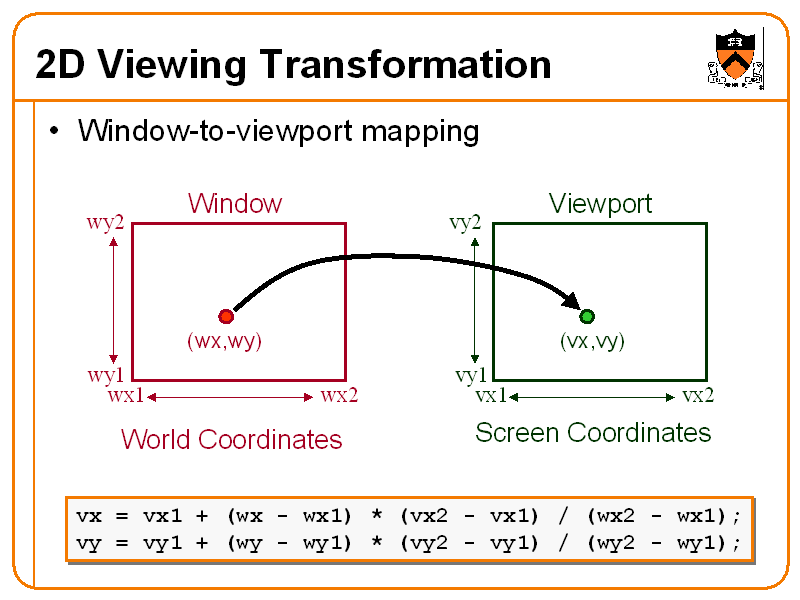
2D VIEWING TRANSFORMATION

Read more...

  © Blogger templates ProBlogger Template by Ourblogtemplates.com 2008

Back to TOP